
About time-based budget pacing controls
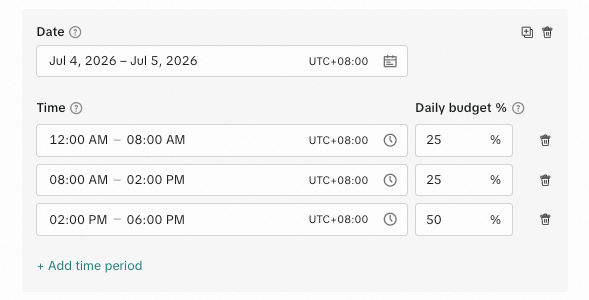
Time-based budget pacing controls give app advertisers the ability to set a precise hourly delivery schedule to accommodate custom delivery needs. By leveraging this feature, you can override the standard daily delivery schedule on set dates to meet your desired hourly budget weightings.
Benefits
Custom & precise budget delivery control: Set precise windows and budget allocations to help maximize campaign delivery when it matters most on sporting game days, new title launches, liveops moments, and more.
On-demand activation: Add time-based budget pacing controls to existing campaigns when needed or configure them in new campaigns.
Flexible flighting: Schedule multiple custom delivery dates at once, all in one place, with flexible hourly timeframes for budget weighting allocations. For example, you can choose to increase budgets before the kickoff or split them evenly between multiple key tentpole moments throughout the day.
How it works
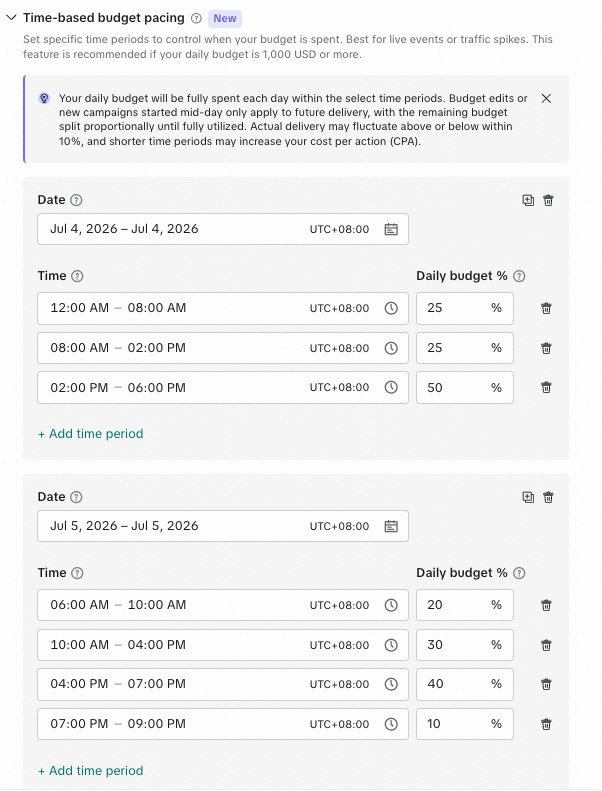
You can apply time-based budget pacing controls to new or existing campaigns at the ad group level for specific future dates to override standard delivery. You'll set specific hourly timeframes based on the time zone of your ad account and allocate percentages of your daily budgets. This can be applied to one date at a time or to multiple dates in a flight.
Availability
Region | Global |
Placement | TikTok |
Operating system | iOS and Android |
Ad objective | App Promotion |
Optimization goals | Mobile App Install (MAI) App Event Optimization (AEO) Value-Based Optimization (VBO) Highest-Value (HV) |
Note: Time-based budget pacing controls are only available for app advertisers in the upgraded Smart+ experience.
Get started
To use time-based budget pacing, go to the Budget and schedule section of your ad group settings and locate the Time-based budget pacing module. To activate a single delivery schedule for one day or across multiple dates, select your flight range and build your delivery schedule.
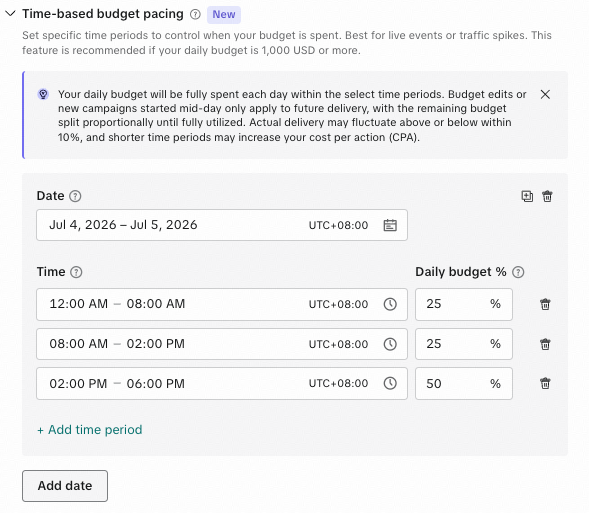
To activate multiple days with different delivery schedules, click + Add time period to add multiple delivery schedules for each individual date.
Setup tips
Time-based budget pacing controls will follow the time zone of your ad account. When using custom time zones for campaign flighting, be sure to account for the time zone of your ad account before setting live.
Be sure to follow best practices of your bid and budget objective in order to maximize the delivery and performance of time-based budget pacing controls.
While time-based budget pacing controls can accommodate most delivery schedules, extreme short-window and high-volume allocations may impact your cost per action (CPAs).
Try to plan ahead as any budget edits or mid-flight adjustments will only affect future delivery and may skew your initial preferred delivery.
For optimal performance when utilizing Event-based (AEO) and Value-based (VBO) optimizations, be sure to give your campaign time to scale and exit the learning phase before applying a custom time-based budget pacing schedule.
