
About affiliate creatives for TikTok Shop Ads
Affiliate creatives are TikTok posts created by affiliates and authorized for use in TikTok Shop Ads. When you use a video created by an affiliate creator in your Shop Ads, affiliate creators can earn commissions when someone buys your products. You can see attribution for gross merchandise value (GMV) between your ads and affiliate creators in Seller Center.
How affiliate creatives work
To set up affiliate creatives, you'll need to create an Open Collaboration with an affiliate creator in Seller Center, then choose your commission rates for your products
Affiliate creators will need to authorize their affiliate videos for Shop Ads
When you create Video Shopping Ads, choose affiliate posts for your video source
Ads attributed to affiliate posts may generate commissions for affiliate creators
Features
Authorize all affiliate posts to be used in Shop Ads: Affiliate creators can authorize all affiliate posts to be featured in Shop Ads in the TikTok app.
For Video Shopping Ads, you can find all authorized affiliate posts.
For GMV Max, advertisers can set Affiliate post as the video source.
Note: The same affiliate post can be authorized for use in Shop Ads through both Affiliate Mass Authorization and by sharing a video code. Affiliate Mass Authorization sets authorization for all of an affiliate creator's posts, while sharing a video code grants authorization for individual affiliate posts. Learn the differences between affiliate mass authorization and video code authorization.
About the Active Ads label for affiliate creators
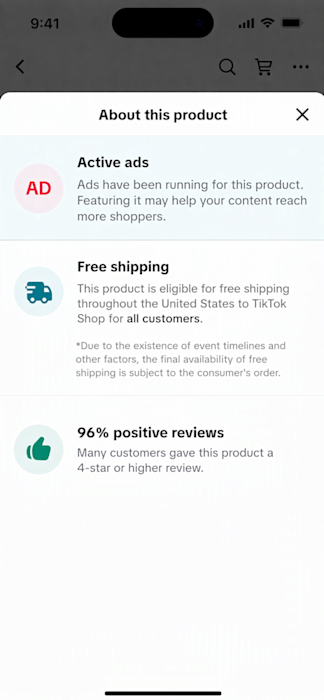
TikTok Shop may show an Active Ads label on a product page in Affiliate center when you have an active GMV Max campaign for the product. This label helps affiliate creators identify products that you are actively promoting through ads.
The label may appear when both of these conditions are met:
The product has an active GMV Max campaign.
The seller has not opted out of this disclosure.
Creators can see that the product is being actively promoted. TikTok Shop does not show your ad spend, campaign budget, or other campaign details through this label.
If you do not want the Active Ads label to appear on your products, contact your sales representative or submit a support ticket to request opt-out.
Note: After you opt out, your product advertising status will no longer appear on affiliate creator product pages but this does not remove sponsored labels or other ad disclosures that may be required where your ads are shown.
About the Ads x Affiliate report in Seller Center
You can see reporting for affiliate creative in Seller Center. The Ads x Affiliate report compares metrics between organic sales and sales generated by ads. When you use affiliate posts in ads, you may see Gross revenue attributed to both Ads & Affiliate in this report.
