About auto-generated images for Product GMV Max
Auto-generate images helps TikTok Shop sellers turn standard product images into more engaging carousel ad creatives for Product GMV Max campaigns. It automatically enhances and repackages your existing assets so you can launch creatives faster and improve campaign performance.
When this feature is on, TikTok uses only the product images you upload and information from your Product Detail Page. It improves backgrounds, layouts, and generate selling points without generating entirely new product visuals from scratch.
Note: Auto-generate images enhances what you already provide (product images and Product Detail Page information). It does not invent new products or replace your product's core visual identity.
Benefits
Automatically sharpens images and optimizes color balance for a more polished look.
Replaces plain backgrounds with fresh, contextually relevant scenes that help products stand out.
Turns existing images into promotional poster-style creatives with a professional layout, and generates key selling points, such as top features or discounts.
Reduces manual creative work when building and iterating on ads.
Availability
Auto-generate images is currently available only to selected sellers in TikTok Ads Manager for Product GMV Max campaigns. The feature is turned on by default, and you can opt out at any time by turning it off.
How to use auto-generate images
In TikTok Ads Manager, create a new GMV Max campaign or open an existing GMV Max campaign to edit.
Open the Ad creative module.
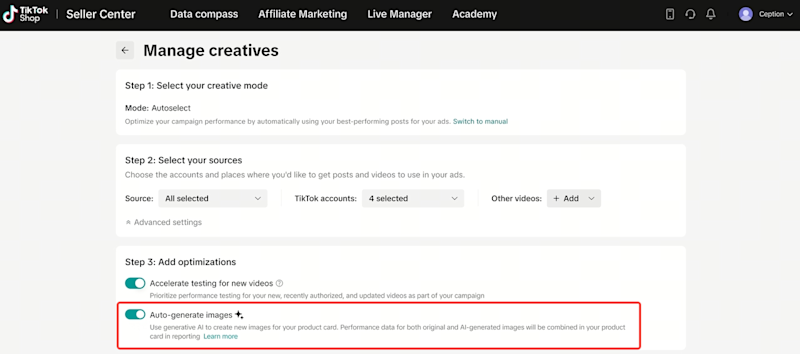
Find the Auto-generate images toggle.
Keep the toggle on to apply image optimization, background generation, and poster generation to your creative images.
Turn the toggle off if you want to use only your original images.
Here is what the toggle looks like in the Ad creative module: