
About Bulk Edit
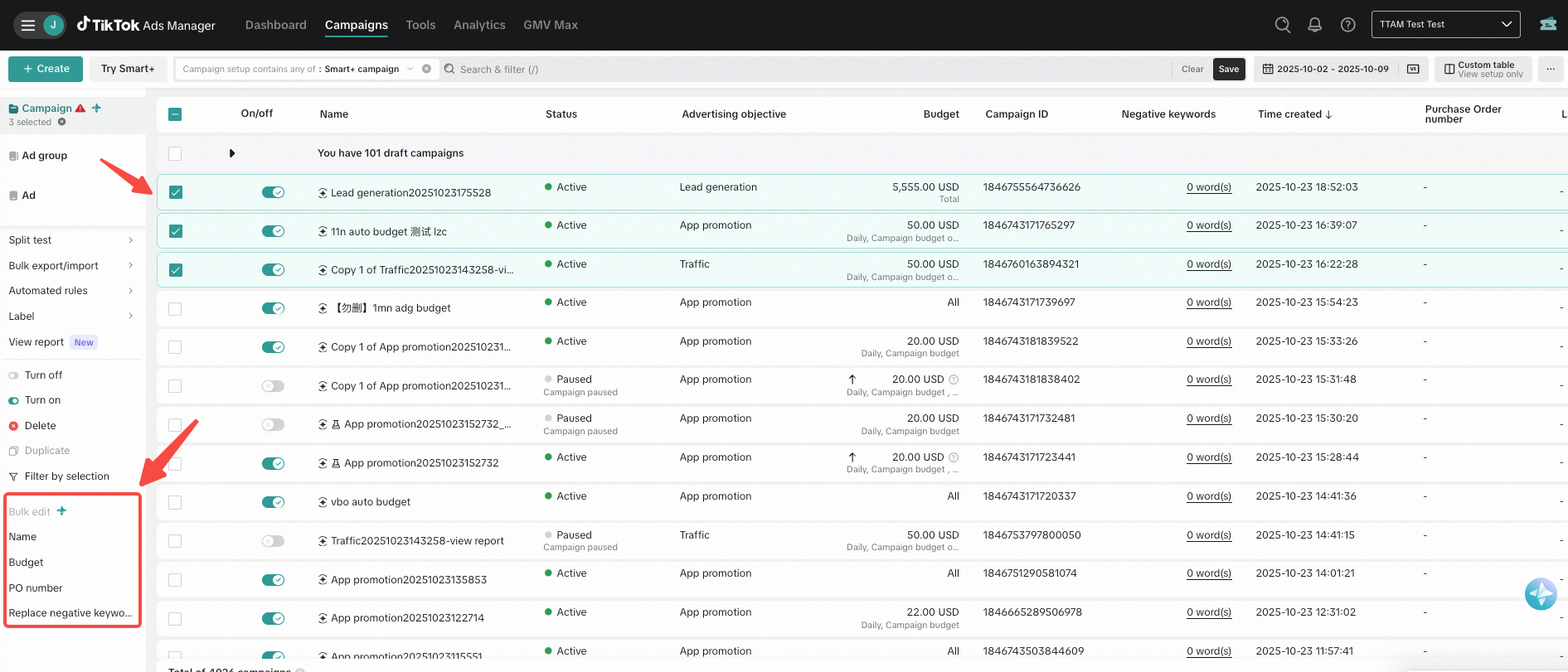
TikTok Ads Manager provides Bulk Edit, an efficiency feature that enables advertisers to update multiple campaigns, ad groups, or ads at the same time.
Bulk Edit helps reduce repetitive work and improves efficiency when managing multiple campaigns, ad groups, and ads.
Benefits
Save time: Minimize repetitive manual tasks by updating budgets, bids, schedules, and other settings in a single action.
Improve workflow efficiency: Simplify complex processes, such as launching multiple campaigns, refreshing creatives, or adjusting bids while maintaining flexibility and control at scale.
Enhance accuracy: Reduce the likelihood of errors that may occur when editing campaigns one by one, ensuring more consistent bids, budgets, URLs, and ad text.
Availability
You can use bulk edit at the campaign, ad group, and ad levels. The fields available for editing depend on the campaign level and the campaign type, such as Manual, Smart+, and Reservation campaigns. Different campaign types support different Bulk Edit fields, and availability may vary across levels. Available:
Campaign level: Bulk Edit supports Ad Status, Name, Budget, Negative Keywords, and PO Number.
Ad Group level: Bulk Edit supports Ad Status, Name, Budget, Bid, Schedule, Age, Gender, and Negative Keywords.
Ad level: Bulk Edit supports Ad Status, Name, Creative, Text, and Destination Link.
Not Available:
Age, and Gender cannot be edited in Manual and Reservation campaigns.
Creative, Text, and Destination Link cannot be edited in Smart+ and Reservation campaigns.
Schedule cannot be edited in Reservation campaigns.
Budget and Bid for Reservation campaigns can only be edited in Reach & Frequency campaigns.
