
Ad Assistant Diagnosis best practices
This guide explains how to interpret Ad Assistant Diagnosis results and taking effective action. It outlines common usage moments and scenario-based guidance to help you review delivery or performance conditions and decide where to take next steps.
When to use
You may find Diagnosis especially useful in the following situations:
Daily monitoring: Incorporate diagnosis into daily checks to identify deviations early and maintain campaign consistency.
Performance volatility: Use diagnosis whenever you observe fluctuations in spend, CPA, conversion volume, or delivery behavior.
Scaling preparation: Before allocating additional budget, ensure no underlying issues exist that could impact efficiency.
How to interpret
When Diagnosis is triggered, you'll see a structured result that helps you understand what the system detected and where to review next. Each result typically includes:
Issue Category: The type of condition identified (e.g., delivery, spend, audience, creative, efficiency).
Insight Summary: A short explanation of what the system observed based on recent activity or performance patterns.
Suggested Actions: Potential next steps you may consider, depending on your setup.
Go-to Link: Direct access to the relevant setting in Ads Manager.
Diagnosis may surface different scenarios depending on what is happening in your ad group. The sections below explain what each scenario means when it appears, common reasons it may be triggered, and what you may want to review.
1. Hardblockers
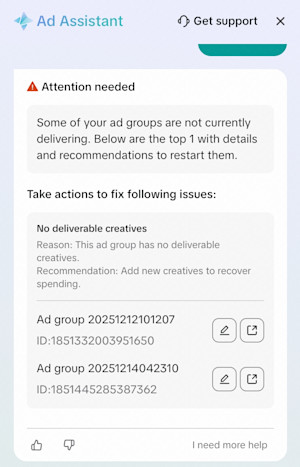
If Ad Assistant Diagnosis tells you: your ad group is not able to be delivered.
Common reasons:
The ad group or campaign is paused
Your account balance does not support delivery
Creatives are rejected or not eligible to be served
Recent edits may have temporarily stopped delivery
What you may want to review:
Whether the ad group or campaign is active
Whether additional balance is required
Creative eligibility or rejection reasons
Whether recent edits need time to take effect
2. Spending drop
If Ad Assistant Diagnosis tells you: your spend is noticeably lower than the previous day.
Common reasons:
Audience size decreased
Fewer creatives are actively delivering
Delivery windows or competition shifted
A recent configuration change affected serving
What you may want to review:
Audience size and availability
Creative-level delivery patterns
Schedule or delivery window settings
Short-term fluctuations after recent edits
3. Insufficient spending
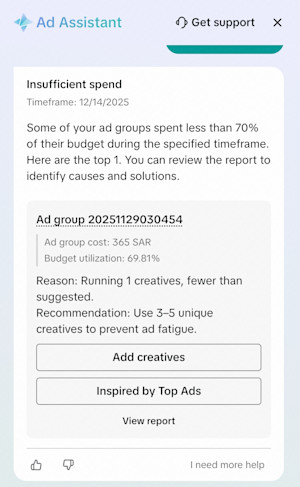
If Ad Assistant Diagnosis tells you: your ad group is not using its budget as expected.
Common reasons may include:
Ad group competitiveness is limited (e.g. weak creatives or insufficient budget)
Account balance is lower than the ad group's daily budget
Budget settings restrict delivery (e.g. lifetime budget)
Delivery window does not align with livestream schedule
Inconsistent optimization goals across ad groups within a CBO campaign
Learning is unstable
What you may want to review:
Refresh creatives or gradually increase budget to improve competitiveness
Add balance to ensure sufficient funds relative to the daily budget
Consider switching from lifetime budget to daily budget
Check whether livestream hours align with the ad delivery schedule
Align optimization goals across ad groups within the same CBO campaign
Extend learning phase
4. High CPA
If Ad Assistant Diagnosis tells you: your CPA is higher than usual or has recently increased.
Common reasons:
Strong-performing creatives stopped delivering
Audience characteristics changed
Learning was reset due to recent edits
Competitiveness shifted
What you may want to review:
Any recent edits to targeting, bids, or creatives
Status of previously top-performing creatives
Changes in audience performance
Whether additional time is needed for stabilization
5. Top-Performing Ad Groups
If Ad Assistant tells you: this ad group is performing well and may be suitable for scaling.
Common reasons:
Stable delivery and CPA
Completed learning
Strong creative - audience fit
What you may want to review:
Increasing budgets gradually
Using duplication for controlled scaling
Keeping core settings stable to maintain performance
