How to integrate TikTok Lead Generation with Mailchimp
You can integrate your Mailchimp and TikTok for Business accounts to automatically sync new leads from your TikTok Lead Generation ads. You can customize the connection by mapping specific TikTok forms to designated Mailchimp audiences and assigning a subscription status upon import.
Learn more about available CRM integrations for TikTok lead generation with Instant Form.
This article covers how to connect TikTok Lead Generation ads to Mailchimp.
Before you begin
Before you integrate TikTok lead generation with Mailchimp, make sure you have:
Created at least one Instant Form on TikTok Ads Manager.
Admin access to the ad account you will be using for integration. Learn about asset level permissions.
You’ll need to decide how the integration syncs your leads in Mailchimp
How it works
To complete the integration, make sure you are signed into both TikTok for Business and Mailchimp accounts to configure your sync settings. First, select the specific TikTok Instant Form you want to use as the lead source. Then, choose the destination Mailchimp audience where these leads will be sent. You will also determine the subscription status (for example, subscribed or non-subscribed) that Mailchimp should apply to these new contacts.
The final step is to map your data fields. This important step ensures that information from your TikTok Instant Form is correctly matched to the corresponding fields in your Mailchimp audience.
Once saved, the integration will be active. New leads generated from your Instant Form will be automatically pushed to your connected Mailchimp audience. This sync runs approximately every 15 minutes to keep your contact lists up to date.
How to integrate TikTok for Business with Mailchimp
Log in to your TikTok Ads Manager account.
Click the Tools tab.
Select Leads Center from the dropdown menu.
Click Connect CRM at the top of the page.
Search for Mailchimp.
Click Direct Integration, and click Confirm.
Log into your Mailchimp account.
From the Mailchimp interface, click Connect.
On the pop-up window:
Select the specific TikTok account, TikTok Instant Form, and Mailchimp audience you want to connect with.
Map the fields in your lead ad to the corresponding fields in your Mailchimp audience.
Select the check box to confirm you understand the rules for subscribed contacts.
Click Sync Now.
How to verify the Mailchimp integration
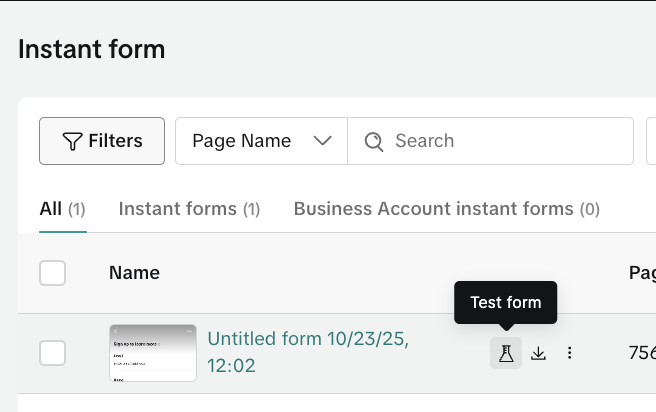
From your TikTok Ads Manager account, click the Tools tab.
Select Leads Center from the dropdown menu.
Select Instant Forms from the left-hand navigation.
Locate the Instant Form that was mapped within Mailchimp.
Click on the Test form icon.

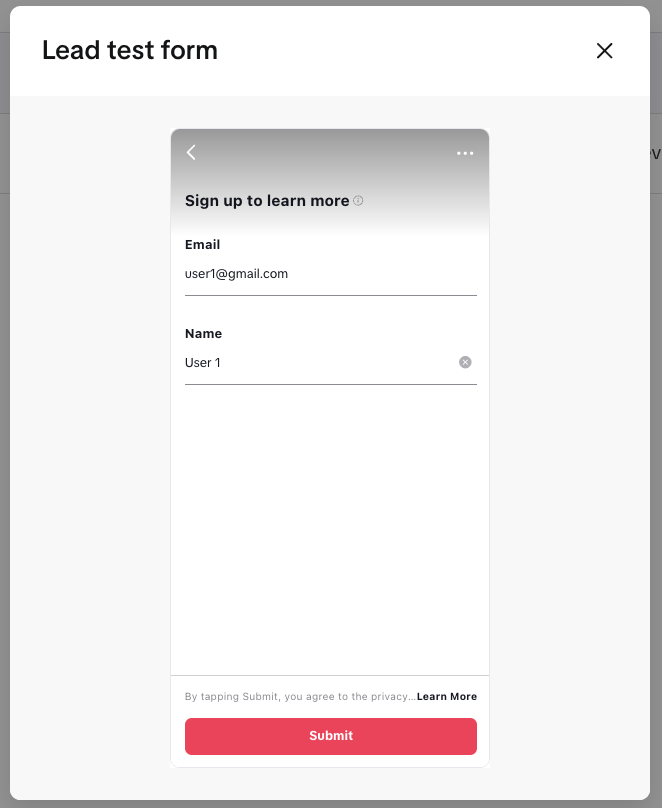
Fill in the fields required in the Instant Form, and click Submit.

After 15 minutes, return to your Mailchimp account and view the Mailchimp Audience that the Instant Form was mapped to to see the data from the Test Form.