About reporting for the upgraded Smart+ experience
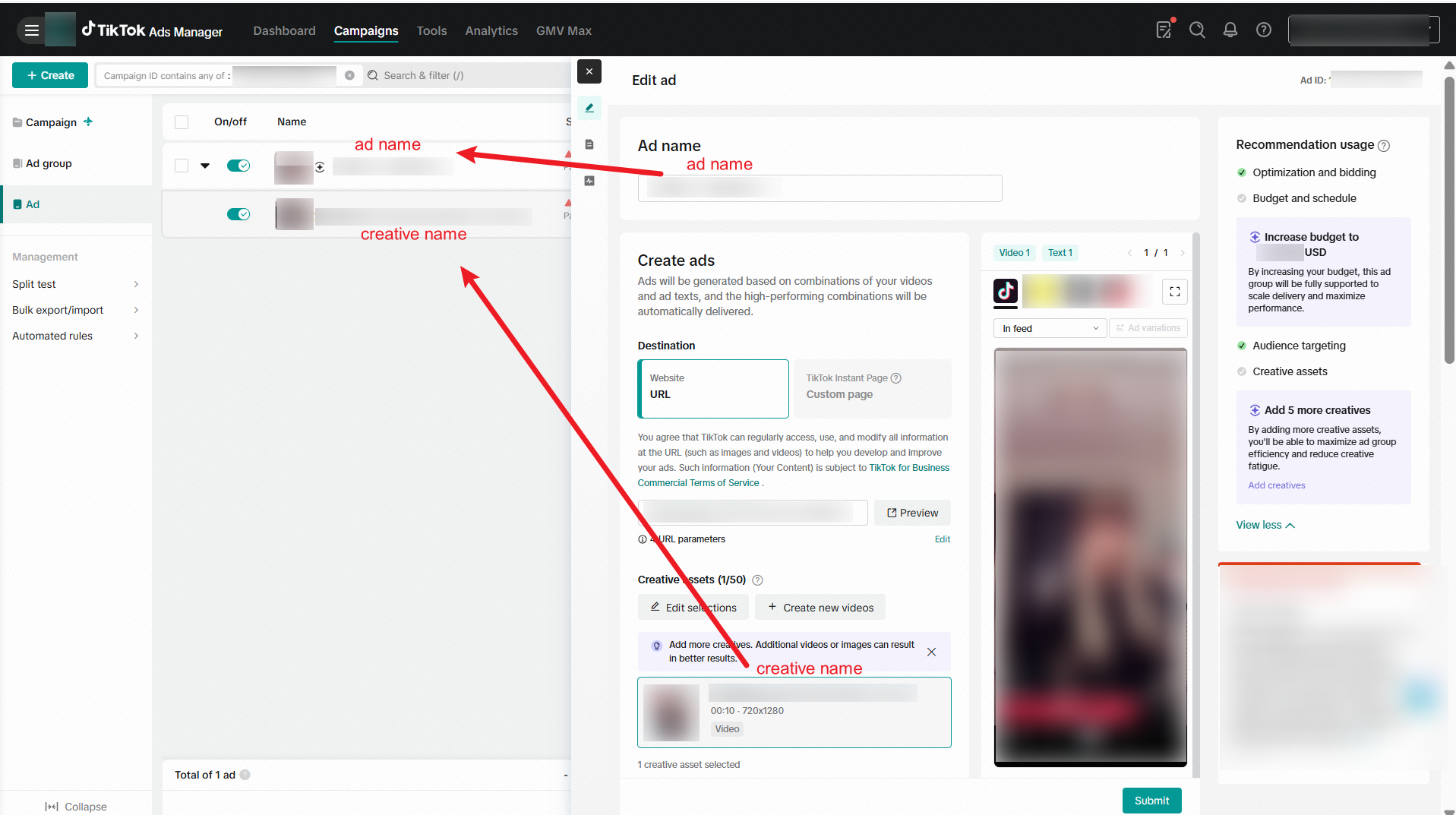
The upgraded Smart+ experience introduces an enhanced campaign structure that gives you greater flexibility in setting up your campaign strategy. The new structure includes four levels: campaign, ad group, ad, and creative. With this structural change, we have also upgraded reporting and third-party tracking to make sure that you continue to have data visibility and insights across all levels. Refer to the table below for a detailed mapping of the current campaign structure:
Level | Description | Identity on TikTok Ads Manager |
Campaign | The highest level that organizes your ad groups | Campaign ID |
Ad Group | Groups multiple ads under a single ad strategy | Ad group ID |
Ad | Bundles creative assets | Ad ID |
Creative | The individual asset (video, image, text) | Smart+ creative ID |
Measurement on third-party platforms
Refer to the instructions below on how to map each level within third-party analytics platforms to ensure accurate and seamless data tracking.
How to set up URL parameters
Macros for ID | Macros for Name | |
Campaign: highest level | __CAMPAIGN_ID__ | _CAMPAIGN_NAME__ |
Ad group: groups multiple ads | __AID__ | __AID_NAME__ |
Ad: bundles creative assets (New) | __ADID_V2__ | __ADID_V2_NAME__ |
Creative: individual assets | __CID__ | __CID_NAME__ |
Learn more about UTM parameters.
How to map data on Marketing API and Mobile Measurement Partners (MMP)
Note: Ad level name and data are not reported on MMPs because the upgraded Smart+ campaign has 4 levels of reporting, while MMP only supports 3 levels of campaign structure.
Level | MMP | MAPI | |
ID | Name | ||
TTAM Campaign name | Campaign name | campaign_id | campaign_name |
TTAM Ad group name | Ad group name | adgroup_id | adgroup_name |
TTAM Ad name | Currently not reported on MMP due to the structural difference | ad_id_v2 Or smart_plus_ad_id | ad_name (While using the |
TTAM Creative name | Ad name (file name of video, carousel, image, etc.) | ad_id | ad_name (While NOT using the |