
Best Practices for Search Ads Campaign Optimization in TikTok Ads Manager
Throughout a Search Ads Campaign lifetime, you have the ability to adjust optimizations including bids, budgets, keywords, and targeting. You can add, change, or remove keywords at any point throughout the Search Ads Campaign flow, and are encouraged to review and optimize campaigns rather than pausing and launching new campaigns.
Before you start
New campaigns typically need 3–7 days to calibrate. During this period called the learning phase, avoid major changes. Aim for minimum data to help the system learn:
Web Conversion: 15–20 conversions
Traffic: 60–100 clicks
If you’re not on pace to hit these thresholds, broaden targeting, raise bids/budgets, or temporarily switch to the Traffic objective to build volume—then return to Web Conversion once stable.
Key terms and concepts: Match Types & Coverage
Broad: highest reach; best for launch and learning.
Phrase / Exact: tighter control; move proven terms here post-learning.
Overly strict match types at launch can constrain volume. You can balance this with a strong negative strategy to filter noise.
Optimize your Search Ads Campaign for scalability
Increase Ad Group bids: Adjust bids and budgets to stay competitive in auctions.
Switch to Traffic (if limited): If a Web Conversion campaign isn’t getting enough impressions/clicks, use Traffic to expand reach and collect signals, then move back.
Review keyword–ad relevance: Keep keywords tightly aligned to your ad creative to improve delivery and auction performance.
Keyword strategy
Our recommended keyword strategy is broken down into three phases: launch, optimize, and exclude.
Launch for scale: Start with Broad match to capture intent variants and learn quickly.
Optimize for precision: Promote proven terms to Exact or Phrase to lock in efficiency and maintain reach.
Exclude noise: Add negative keywords for irrelevant queries (use the Search Terms report).
Tip: Keep keyword–creative relevance high at each stage; relevancy is measured per keyword–creative pair.
Optimize your Search Ads Campaign for efficiency
Ensure there’s enough scale: Confirm you’re meeting the Learning Phase thresholds above in the first few days; if not, broaden targeting, raise bids/budgets, or switch to Traffic temporarily.
Review Search Terms Report: Remove irrelevant queries with negatives or pause problem keywords.
Add negative keywords: Import brand-safety and performance negatives from other paid search where applicable.
Re-check relevance: Keep ad creative, titles, and descriptions aligned to your ad group’s keyword set.
Bidding
Budget-to-Bid ratio
As a starting point, set daily budget ≈ 20× target CPA.
Example: $10 CPA → $200/day. This helps ensure enough auctions and learning velocity for stable delivery.
Traffic supported bid strategies
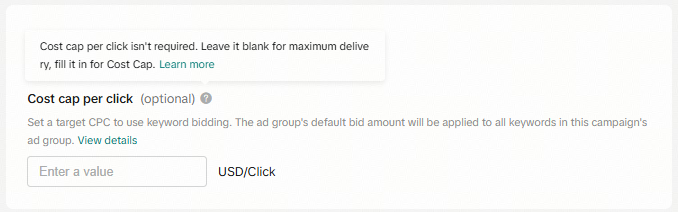
Maximum Delivery or Cost Cap
To use Maximum Delivery, don't enter a bid price and the ad group will default to max delivery
To use Cost Cap, enter your target bid within the Bidding and Optimizations section as a part of the ad group setup
Web Conversion supported bid strategies
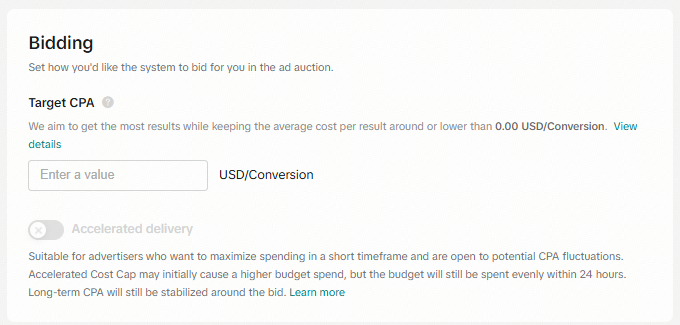
Only Target CPA is supported. Enter your target bid within the 'bidding and optimizations' section as a part of the ad group setup.
Keyword bidding for Traffic objective
You can set keyword-level bids under the Traffic objective and view reporting by match type.
Leave the keyword bid blank to follow the ad group setting, or
Set a specific bid for the selected keyword(s)
Note: To access this, there must be a valid bid in the bidding module. Keyword bidding is based on the cost cap bidding, so it shows only when there is a valid bid.
If you select option 2, be mindful of your ad group bid strategy and if your keyword level bids are above or below the ad groups. If above, there is the potential that the ad group level reported CPC will be higher than the ad groups bid.
How to Access Keyword Bidding
Access keyword bids and match-type controls during campaign creation through the Keyword Suggestion Tool or directly in TikTok Ads Manager within the ad group. You can bulk-edit ad group bids from the campaign list, or edit individual keyword bids and match types within the ad group.
